
CMMC Level 1 Self-Assessment Guide: What to Document for All 15 Requirements + Templates
If your DoD contract requires CMMC Level 1, reading the list of requirements is only the first step. You also need to figure out which parts of your business handle Federal Contract Information (FCI), put 15 basic safeguards in place, and collect enough proof to show each one is working.
This guide turns that process into a step-by-step sequence. You'll define what's in scope, write the policies and procedures you need, gather the records and screenshots that back them up, work through the self-assessment, and submit your results and affirmation in the Supplier Performance Risk System (SPRS).
For each document, we explain what it is, why it matters, which Level 1 requirements it supports, what to put in it, and what proof to keep alongside it. You'll also find downloadable templates built by our team of former federal assessors and compliance experts that you can customize for your company.
Just note that templates are a starting point, not a finished product. Your final documents need to describe your people, systems, and facilities, and the safeguards need to be up and running before you report compliance.
Work through this guide from top to bottom and you'll finish with a complete set of Level 1 documents and a clear path through your self-assessment.
What CMMC Level 1 is and who needs it
CMMC Level 1 applies when a DoD solicitation or contract requires you to hold a CMMC status of Final Level 1 (Self) for the systems that handle Federal Contract Information (FCI).
FCI is information the government gives you, or that you create for the government under a contract, that isn't meant for the public. Statements of work, delivery schedules, specifications, and drawings attached to an RFQ are common examples.
Not everything tied to a contract is FCI. Information the government has already made public isn't, and neither is basic payment information like invoice totals. If you're not sure whether something counts, check the contract and ask your contracting officer or a compliance professional.
The 15 Level 1 requirements come from FAR Clause 52.204-21. Some newer contracts use updated FAR language instead, where the same requirements appear under Clause 52.240-93. You can check your contracts to see which number they use, but the requirements are the same either way.
Your contract will also say which CMMC level you need, usually through DFARS clauses 252.204-7025 or 252.204-7021. The FAR safeguarding clause on its own doesn't tell you that Level 1 is required, you’ll need to look for the CMMC clause.
Level 1 is for FCI. If your systems handle Controlled Unclassified Information (CUI), you’ll need to meet CMMC Level 2.
Step 1: Understand what CMMC Level 1 requires
To reach Final Level 1 (Self) status, you need to:
- Decide which systems, people, and places are in scope
- Put the 15 Level 1 requirements in place
- Check each one against its assessment objectives
- Enter your self-assessment results in SPRS
- Have a company leader submit an annual affirmation in SPRS that you're still compliant
No third-party assessor is involved at Level 1. You check your own work, write down the results, and report that you're compliant. When you do, the DoD records a status of "Final Level 1 (Self)" for your company in SPRS. Because you're making a formal statement to the government, your documents need to match what you're doing. Reporting compliance you don't have can create legal problems under the False Claims Act.
If you've seen news about the CMMC Phase 2 pause: it doesn't affect Level 1. Level 1 has always been a self-assessment, and it's still required on applicable contracts today.
The DoD publishes two official documents for Level 1. Both are written for contractors, and this article follows their guidance:
CMMC Level 1 requirements at a glance
The 15 requirements are grouped into six areas, called security domains.
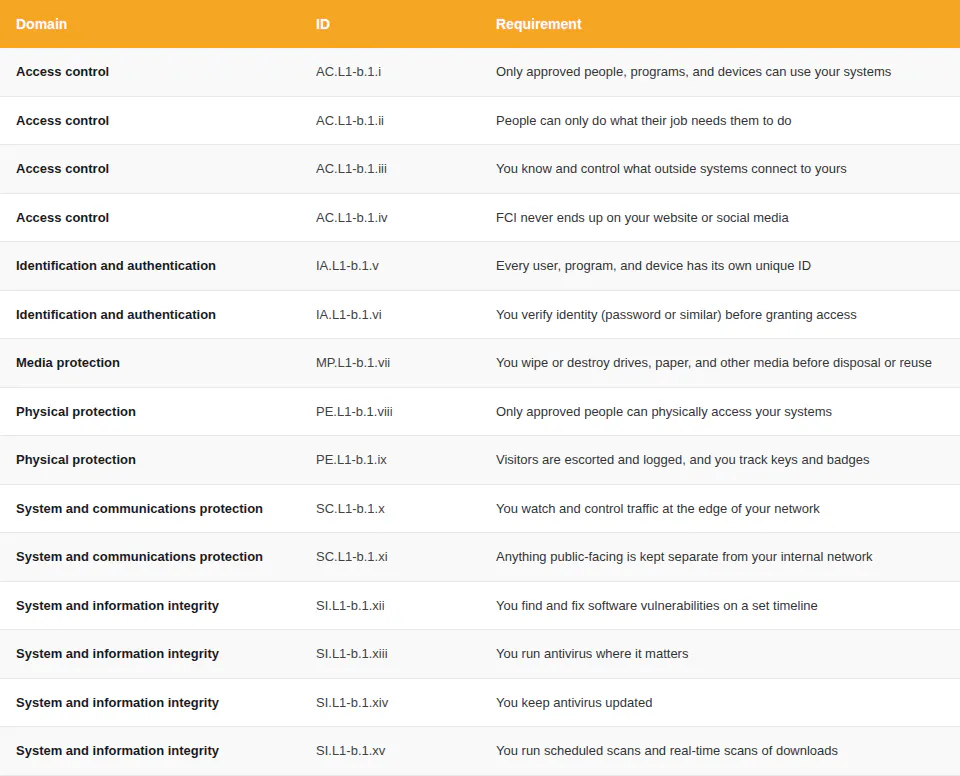
Before you begin documenting anything, read the full list of 15 requirements and their 58 assessment objectives. The objectives are the specific things you'll need to show you've done, and reading them first tells you exactly what your documents need to cover.

CMMC Level 1 checklist
See all 15 requirements and 58 assessment objectives in one place. Use this checklist to see exactly what your documents need to cover.
Step 2: Define your Level 1 assessment scope
Your scope is everything that stores, handles, or sends FCI. Before you start checking any CMMC Level 1 requirements, figure out where FCI comes into your business, where it goes, who touches it, and which computers, software, and rooms are involved.
For most small to mid-size defense contractors, scope looks something like this:
- Office computers used for contract documents
- Shop floor computers that open job files or drawings
- Company email
- Your server (if you have one), router, firewall, and Wi-Fi
- Cloud services where FCI is stored
- Your ERP or quoting software
- Phones or tablets used to open FCI
- The rooms where any of this lives, and the people who use it
Personal phones and home computers count too if anyone uses them to open contract documents or email. Some devices are treated differently under the Level 1 scoping rules (a CNC controller that never sees FCI, for example), so don't assume everything on your network is in scope the same way.
The DoD doesn't require a specific scope document at Level 1, but write your scope down anyway. It's the foundation for every document that follows, and it makes your next self-assessments and annual affirmations much faster.
Refer to the DoD's CMMC Level 1 Scoping Guide for details on how to establish an accurate assessment scope.
Step 3: Decide whether to write a System Security Plan
A System Security Plan (SSP) is a document that describes your systems, where the boundary is, and how you meet each requirement.
An SSP is not required at CMMC Level 1, but writing one now is recommended and helps in a few ways. It gives you one place that describes your scope and connects each requirement to the safeguard and the evidence behind it. When it’s time for next year’s affirmation, you'll have one document to review instead of hunting through separate files. And if you ever need CMMC Level 2 certification, you'll already have a solid starting point.

CMMC SSP Template
While not a hard requirement for Level 1, this one document describes your system and how you meet each requirement. Download the template to keep your compliance efforts focused and organized.
Step 4: Write your Access Control procedures
Access control is about who can get into your systems and what they can do once they're in. Three of the four access control requirements are covered here. The fourth, keeping FCI off public websites, gets its own policy in the next step.
CMMC Level 1 requirements supported
- AC.L1-B.1.I: Limit system access to authorized users, processes, and devices. Know who is allowed to use your systems. Make sure only those people, the software running for them, and approved devices can connect.
- AC.L1-B.1.II: Limit access to the transactions and functions authorized users are permitted to execute. Not everyone who can log in should be able to do everything. Decide what each job role can do and set up your systems to enforce it. For example, a machinist may need to open job files but not change payroll.
- AC.L1-B.1.III: Verify and control connections to external systems. List every outside system that connects to yours: cloud services, customer portals, a supplier's file-sharing site, personal devices. Confirm each one is legitimate and decide how it can be used.
What to document
Your access control procedure needs to answer these questions:
- Who are your authorized users? Keep a current list. Include contractors, part-time staff, and any software accounts.
- What can each person do? A simple table works. List each job role and the systems and functions it can use.
- How do you add and remove users? Write the steps for setting up a new employee's accounts and for shutting them off when someone leaves. Include who approves access and how fast it gets turned off after a departure.
- What outside systems connect to yours? List them, note who approved each one, and say how you control them.
Be specific. "Only authorized users can access the system" just repeats the requirement. "The office manager approves all new accounts, and HR tells the office manager within one business day when someone leaves so their accounts can be shut off" is a procedure.
Evidence to collect
Keep these alongside the procedure:
- Your authorized user list
- Your job role table (who can do what)
- Your device list
- Your list of outside systems and who approved each one
- A screenshot showing a former employee's account is disabled
- The date and note from the last time someone left and you turned off their access
To test it, have someone try to log in with a disabled account and make sure the attempt fails.

Access Control Procedures Template
Document who can use your systems, what each person can do, and how you turn access on and off.
Step 5: Write your Public Information Policy
This policy keeps FCI off anything the public can see: your website, public file-sharing links, and social media.
CMMC Level 1 requirements supported
- AC.L1-B.1.IV: Control information posted to publicly accessible systems. Make sure FCI doesn't end up on your website, social media, or anywhere else the public can see it. Decide who can post, review content before it goes up, and have a way to take it down if something slips through.
What to document
- Who is allowed to post on behalf of the company
- Which public websites and accounts the company uses
- How posts get reviewed before they go live
- What reviewers look for (customer names, part numbers, drawings, delivery dates, anything from a contract)
- What an employee should do if they spot contract information online
- How you take it down and who you tell
Evidence to collect
- Your list of approved posters
- Your list of company websites and social accounts
- A screenshot of who has posting rights on each account
- A note or email showing a post was reviewed before it went up
- Any instructions you've given employees about what not to post

Public Information Policy Template
Keep FCI off your website and social media. Use this policy to clarify who can post, review processes, and what to do if something slips through.
Step 6: Write your Identification and Authentication Procedures
Access control decides who is allowed in. Identification and authentication is how you confirm someone is who they say they are before you let them in. Level 1 has two requirements here: give every user, process, and device its own identity, then verify that identity before granting access.
CMMC Level 1 requirements supported
- IA.L1-B.1.V: Identify system users, processes, and devices. Every person, automated program, and device that uses your systems needs its own unique ID. No shared logins. If three people use "shopfloor1" to log into the same computer, that's a gap.
- IA.L1-B.1.VI: Authenticate identities before allowing access. Check each identity with a password, security token, or similar method before letting anyone in.
What to document
- How you give each user, program, and device a unique ID
- Your password rules (how long, what characters, how often they change, whether old passwords can be reused)
- How you change the factory-default passwords on new equipment and software
- What login method each system uses
- How you handle passwords for software accounts and automated programs
- How you identify and verify devices on your network
Give every person their own account. If you truly need a shared login somewhere (a shared shop floor terminal, for example), write down why, and describe how you still know who used it and when.
Multi-factor authentication is not one of the 15 Level 1 requirements, but it's the single most effective way to stop someone who has stolen a password. Enable MFA for email, remote access, and administrator accounts.
Evidence to collect
- A screenshot of your user accounts showing everyone has their own login
- Your password settings (from Windows, Microsoft 365, Google Workspace, or wherever you manage logins)
- Your device list
- A note showing you changed the default password on new equipment (the router, the firewall, the copier)
- If you use multi-factor authentication, a screenshot showing it's on
To test it, watch someone log in. It should ask for a password (and a code, if you use MFA) before anything opens.

Identification and Authentication Procedures Template
This template walks you through documenting Level 1 Identification and Authentication requirements, with a list of evidence to keep.

NIST 800-63B Password Policy Template
Set password requirements that are aligned with current NIST standards, including length, complexity, reuse, and reset rules.
Step 7: Write your Media Protection Procedures
Media means anything that stores data: hard drives, USB drives, backup drives, printed documents, and the internal memory in a copier or printer. When media that has held FCI leaves your control, the FCI needs to be gone first.
CMMC Level 1 requirements supported
- MP.L1-B.1.VII: Sanitize or destroy media containing FCI before disposal or reuse. Before you throw away, sell, donate, return, or reuse any media that has held FCI, wipe it or physically destroy it.
What to document
- What counts as media in your organization. Include the obvious (laptops, external drives, USB sticks) and the easy-to-miss (the copier that scans POs, an old desktop in the back, backup drives, phones).
- How you wipe or destroy each type. Software wiping for hard drives, shredding for paper, physical destruction for drives you can't wipe.
- Who does it and who checks that it was done
- How you record what was wiped or destroyed, when, and by whom. A simple log is enough.
- What happens to leased equipment or anything you return to a vendor. If the leasing company takes the copier back, the FCI on its hard drive needs to be gone first.
If you want a reference for wiping methods, NIST SP 800-88 is the government standard. Your procedure doesn't need to mention it specifically, but the methods you use should align with it.
Evidence to collect
- Your disposal log (what, when, who, how)
- Certificates from a shredding or e-waste company, if you use one
- The report from your wiping software, if you use one
- A photo of a destroyed drive, if that's your method
- Paperwork from the leasing company confirming the copier's drive was wiped or removed

Media Protection Procedures Template
Document how you wipe or destroy anything that's held FCI before it leaves your hands.
Step 8: Write your Physical Protection Procedures
Physical protection is about who can physically get to your computers and equipment. That includes the office, any server closet, the shop floor computers, and anywhere else FCI is stored. Level 1 has two requirements here: limit physical access to authorized people, and manage visitors, access logs, and things like keys and badges.
CMMC Level 1 requirements supported
- PE.L1-B.1.VIII: Limit physical access to systems, equipment, and operating environments to authorized individuals. Decide who is allowed in spaces where FCI systems are and keep everyone else out.
- PE.L1-B.1.IX: Escort visitors, monitor visitor activity, maintain physical access logs, and control physical access devices. Visitors are escorted while they're in secure areas. You keep a log of who entered and when. You track who has keys, badges, and door codes.
What to document
- Which spaces are in scope. If FCI only lives on the two computers in the front office, the scope is the front office. If you have a server closet, add it. If job files are on a shop floor computer, the shop floor counts too.
- Who is allowed in each space
- How you control entry (locks, badges, keypad codes)
- Your visitor procedure: who can approve a visitor, how they sign in, who walks them around, and where they can and can't go
- How you track keys, badges, and codes. Who has them, and what happens when someone leaves.
- Your sign-in log format and how long you keep it
Match the procedure to your building. A small office with two in-scope computers needs less than a shop with FCI in the office and on the production floor.
For most small shops, the physical security logbook template below is all you need. Keep it at the front desk or next to the door to any secure area. Visitors sign in and out.
Evidence to collect
- Your visitor logbook with completed entries
- Your list of who has keys, badges, or door codes
- Door access reports, if you use badges
- A simple floor plan marking the in-scope rooms
- Photos of the locks, badge readers, or keypads
To test it, walk a visitor through the process and see whether the sign-in and escort happen the way your procedure says.

Physical Protection Procedures Template
Document who can get into the rooms where FCI lives, how you control access, and how to handle visitors.

Physical Security Logbook Template
Get a ready-to-print visitor and access log that covers the Level 1 logging requirement.
Step 9: Write your System and Communications Protection Procedures
This is your network's outer edge. The two Level 1 requirements here cover watching and controlling the traffic that comes in and goes out of your network, and keeping any public-facing systems (like a website you host yourself) separate from your internal network.
CMMC Level 1 requirements supported
- SC.L1-B.1.X: Monitor, control, and protect communications at external and key internal boundaries. Decide where your network ends, then watch, control, and protect the traffic that crosses that line. A firewall is the standard way to do this.
- SC.L1-B.1.XI: Implement subnetworks for publicly accessible components that are separated from internal networks. If you run anything the public can reach, put it on its own separate network so a break-in there can't spread to your internal systems.
What to document
- Your network boundary. What's inside, what's outside, and where the line is. A simple hand-drawn diagram is fine: internet, then firewall, then your office network and Wi-Fi, then the computers and devices on it. Add any remote connections and the cloud services you use.
- How your firewall is set up. What's allowed in, what's allowed out, and who manages it. If an IT provider manages it for you, name them.
- Any internal boundaries. If you keep the shop floor network separate from the office network, or keep FCI computers separate from general-use computers, write that down.
- Anything public-facing and how it's kept separate
- How you watch boundary traffic and who checks the logs or alerts
If your website is hosted by a company like Squarespace, GoDaddy, or a web design firm, write that down and keep something that shows it (your hosting invoice or account page works). Outsourcing doesn't automatically cover every objective, though. Be clear in your documents about what the hosting company handles and what's still on you.
Evidence to collect
- Your network diagram
- A screenshot or export of your firewall rules
- Anything from your IT provider describing what they manage for you
- A screenshot of your firewall's logging or alert settings
- Your hosting provider's invoice or account page, if your website is hosted elsewhere

System and Communications Protection Procedures Template
Document where your network ends, how your firewall is set up, and how anything public-facing stays separate.
Step 10: Write your System and Information Integrity Procedures
This is about keeping your software updated and protected from viruses and malware. Four of the 15 Level 1 requirements are here, which tells you how much of the real risk to small contractors comes from outdated software and malicious code.
CMMC Level 1 requirements supported
- SI.L1-B.1.XII: Identify, report, and correct system flaws in a timely manner. Decide how quickly you'll find, report, and fix software vulnerabilities, then stick to it.
- SI.L1-B.1.XIII: Provide protection from malicious code at appropriate locations. Run antivirus or anti-malware software where it matters: every computer, any servers, and your email.
- SI.L1-B.1.XIV: Update malicious code protection when new releases are available. Keep your antivirus software and its virus definitions current. Automatic updates handle this.
- SI.L1-B.1.XV: Perform periodic system scans and real-time scans of external files. Schedule regular full scans and make sure real-time scanning is turned on for downloads, email attachments, and USB drives.
What to document
- Your patching timeframes. The requirement says you have to specify how fast you find, report, and fix flaws. A common approach: critical updates within 7 days, high-priority within 30, everything else within 90. The numbers are yours to set. Pick ones you can meet every time.
- How you find out about vulnerabilities (automatic update notifications, your IT provider, alerts from CISA, the government's cybersecurity agency)
- Who is responsible for updating each type of system
- Which antivirus product you use and where it's installed
- How updates are applied and how you confirm they worked
- Your scan schedule, and confirmation that real-time scanning is on
- What happens when the antivirus finds something
Evidence to collect
- A screenshot of your update settings (Windows Update, Mac software update, or your IT provider's tool)
- A recent patch report or a list of updates installed and when
- A screenshot of your antivirus dashboard showing it's installed everywhere and up to date
- Your scan history
- Any record of a detection and what you did about it
To test it, download a harmless test file (the EICAR test file is made for this) and confirm your antivirus catches it.

System and Information Integrity Procedures Template
Set your patching timeframes, name your antivirus, and write down your scan schedule. This template covers all four Level 1 SI requirements.
Step 11: Build your Level 1 evidence file
Level 1 is a self-assessment, but you still need proof. When you tell the DoD you're compliant, you're saying specific practices are in place. Written documents are how you prove that, both to yourself during the assessment and to anyone who asks later, like a prime contractor doing a supplier review.
Policies give you four things:
- A record of your decisions. Who can log into which computers, what happens when a visitor shows up, how often you run a virus scan. Writing these down forces you to decide.
- Consistency. Employees follow the same process because there's a process written down.
- Faster assessments. When it's time for your annual self-assessment, you compare your documents to what's happening on the floor instead of trying to remember what you do.
- An affirmation you can stand behind. Your company leader is signing a statement to the government. Documents and evidence are what make that signature defensible.
But policies alone don't prove compliance. The proof is the evidence you've been collecting at each step above:
- Your user and device lists
- Screenshots of settings
- Firewall rules and your network diagram
- Your visitor log, disposal log, and patch history
- Exports from your antivirus and other tools
- What the responsible people say when you ask them how a process works
- What happens when you test a safeguard
Your evidence file should tell one consistent story: the document describes the process, the people responsible can explain it, and the system does what the document says.
For each of the 15 requirements, keep a short note that lists:
- The evidence you're relying on
- Where it's stored
- Who owns it
- When you last checked it
- Anything someone would need to know to make sense of it
Evidence has to be final. A draft policy or a procedure nobody has approved can't support a MET result. Finish and approve your documents before you assess against them.

CMMC Level 1 Evidence Collection Spreadsheet
Track the proof behind every requirement in one place. For each of the 15 requirements, record evidence, where it lives, who owns it, and when it was last updated, so your self-assessment and annual affirmation are ready to defend.
Step 12: Complete the CMMC Level 1 self-assessment
Once you have your assessment package ready, you (or a consultant you hire) go through the checklist, check each objective against your documents and evidence, and record the results. SPRS is where you report those results when you're done.
Here’s the full process:
Confirm your scope hasn't changed
Re-read your system list. Has anyone started using a personal laptop for work? Did you add a cloud service? Did a computer move from the office to the shop floor? Small changes just mean updating your documents. A big change, like moving to a new building or switching to a new cloud platform, may trigger a new assessment rather than reaffirming compliance next year.
Work through each requirement and assessment objective
For each of the 58 objectives, you're deciding one of three things:
- MET: the objective is fully satisfied and you can show it
- NOT MET: it isn't satisfied, or you can't show it
- NOT APPLICABLE: the objective doesn't apply to your environment
The DoD's Level 1 Self-Assessment Guide describes three ways to check each objective:
- Examine: look at the document, the setting, or the log. Open your access control procedure and confirm it lists your authorized users. Open your antivirus console and confirm real-time scanning is on.
- Interview: ask the person responsible. Ask your office manager to walk through what happens when someone quits. If their answer matches the procedure, good. If it doesn't, either the procedure or the practice needs to change.
- Test: try it. Have someone attempt to log in with a disabled account. Plug an unapproved USB drive into a computer and confirm it gets scanned.
Use NOT APPLICABLE carefully and write down why. For example, the public-system separation requirement (SC.L1-b.1.xi) is NOT APPLICABLE if you don't host anything public-facing yourself. Write that in your results: "We do not host any publicly accessible systems. Our website is hosted by [provider]." An objective isn't NOT APPLICABLE just because you haven't gotten to it yet. That's NOT MET.
To reach Final Level 1 (Self), every objective has to be MET or genuinely NOT APPLICABLE. If even one objective under a requirement is NOT MET, the whole requirement is NOT MET.
Close any gaps
Level 1 does not allow a Plan of Action and Milestones (POA&M). If you find a NOT MET, stop and fix it. Turn on the setting, write the missing procedure, install the antivirus, put the logbook by the door. Then re-check the objective. Most Level 1 gaps are quick fixes once you know they're there.
Finalize your self-assessment report
Write up what you found. Your record should include:
- The date you completed the assessment
- Who performed it
- For each of the 15 requirements, the result (MET or NOT APPLICABLE, since nothing should be NOT MET at this point)
- For any NOT APPLICABLE, the reason
- Where the evidence for each requirement lives
Keep this record with your policies and procedures. If a prime contractor asks how you know you're compliant, this is what you can show them. It's also your starting point for next year's assessment.
Get your affirming official's sign-off
You can hire an outside consultant to help with the self-assessment, but the annual affirmation has to come from a senior person inside your company: an owner, president, or executive who can speak for the company. They're making a legal statement to the government that all 15 requirements are met, so they should review your results and the evidence before they sign, not just take your word for it.
Submit in SPRS
SPRS is accessed through the Procurement Integrated Enterprise Environment (PIEE), the DoD's contractor portal. If you've never used it, plan for some setup time. Getting an account approved can take days.
What you'll need:
- A PIEE account for whoever enters the assessment, with SPRS access. If your affirming official is a different person, they need their own account too.
- Your company's CAGE code
- Your assessment date and results
In SPRS, you'll enter a CMMC Level 1 self-assessment for your CAGE code, record that all requirements are met, and enter the assessment date. Your affirming official then submits the affirmation. When both are in, your company's status shows as Final Level 1 (Self).
If you already report a NIST 800-171 score in SPRS for other contracts, this is a separate entry. The Level 1 self-assessment has its own place in SPRS.
Set your annual affirmation cycle and maintain compliance
Your Final Level 1 (Self) status is good for one year. Set a reminder a couple of months before it expires so there's time to:
- Re-validate your assessment scope
- Update policies and documents
- Refresh evidence
- Close any newly discovered gaps
You should also re-check sooner if something material changes: you move, you add a new cloud service, you hire an IT provider, or you start handling FCI in a new way. Your documents and your affirmation need to describe the system you're running now, not the one you had last year.
Official CMMC Level 1 resources
CMMC Level 1 FAQs
How many controls are in CMMC Level 1?
Level 1 has 15 requirements with 58 assessment objectives. Some older resources say 17. That was the count in an earlier draft of the DoD's assessment guide, which listed four physical protection requirements. Version 2.13 of the guide (September 2024) merged three of them into one, PE.L1-B.1.IX, bringing the total to 15.
Is a POA&M allowed at Level 1?
No. Every requirement has to be fully met before you report compliance. You can't affirm Level 1 with a plan to close gaps later. If you find a gap during your self-assessment, fix it first.
Does CMMC Level 1 require an SSP?
No. A System Security Plan is required at Level 2, not Level 1. Writing one anyway is a good idea. It gives you one document that describes your whole system and how you meet each requirement, and it gives you a head start if you ever need Level 2.
What's the difference between CMMC Level 1 and Level 2?
Level 1 protects FCI and has 15 requirements you self-assess every year. Level 2 protects CUI and has 110 requirements from NIST SP 800-171. All 15 Level 1 requirements are included in Level 2, so nothing you do for Level 1 is wasted if you move up.
Do you get a SPRS score at Level 1?
Level 1 doesn't use a numerical score. You report each requirement as MET or NOT MET, and if everything is met, your company gets a status of Final Level 1 (Self) in SPRS. The numerical SPRS score (out of 110) is a Level 2 concept.
Is CMMC Level 1 a certification?
Not officially. No certificate is issued and no outside assessor is involved. You complete a self-assessment and your status is recorded in SPRS. Most people, including primes and some contracts, still call it "Level 1 certification," and you'll be understood if you do too.
Does the CMMC Phase 2 pause change anything for Level 1?
No. The pause affects third-party assessments at Level 2. Level 1 has always been a self-assessment and is still required on applicable contracts.
How much does CMMC Level 1 cost?
The DoD's own estimate for a Level 1 self-assessment is roughly $4,000 to $6,000. Your real cost depends on how much of the 15 requirements you already meet and whether you need to buy antivirus software, a firewall, or IT help to close gaps.